Understanding Network Devices

We use the internet every day on our phones and laptops.
With just one click, we’re instantly connected.
But have you ever wondered where the internet comes from and what happens behind the scenes when you tap “Connect”?
Although the internet feels invisible, many powerful devices and technologies work silently to make that connection possible.
In this blog, we’ll uncover how internet connectivity actually works — in simple and easy language.
How Internet Works ?
Let us understand this with an example.
It’s Sunday evening and you want to eat pizza.
So, you take your mobile, turn on Wi-Fi, open the browser, and type swiggy.com (assuming you are using a home Wi-Fi router).
When you type swiggy.com and hit Enter, the browser creates a request and sends it to the Wi-Fi router installed at your home (in most cases, modem and router are combined in a single device).
Before contacting Swiggy’s server, the router/ISP first uses DNS to convert swiggy.com into its IP address.
After that, the router forwards this request to your ISP (Internet Service Provider) such as Jio Fiber or Airtel Fiber.
The ISP then routes this request through the global internet infrastructure using fiber-optic cables, where data travels at nearly the speed of light.
This request finally reaches the Swiggyserver.
When the server receives the request, it starts sending the response (pizza list, images, prices, etc.) in small data chunks called packets.
These packets travel back:
Server → Internet → ISP → Router → Your browser
Your browser collects all the packets, arranges them properly, and renders the webpage.
And that’s how you are able to see the list of pizzas on your screen
//Image of Internet working
Modem
A modem is a first device that connects your house to the internet. However, the ISP provides you with internet, but it only knows analog signals and our computer only understands digital signals. In this way, communication between our device and ISP is not possible.
So here, the modem comes into the picture. The modem act as a translator between the router and the ISP so that they can establish a good communication.
Main functions of modem : -
Modulation :- It transmits the signal by converting it from digital to analog signal.
Demodulation :- It receive the analog signal and converts it to a digital signal.
For example, if you want to talk with a Spanish guy but he is not able to understand your language and you are not able to understand his language ,in that case you need someone who knows both languages and can translate your language into a Spanish language and vice versa.

Router
A router is a device which is used to connect two or more networks or subnetworks. It serves two main functions : -
It manages traffic between the connected networks by forwarding data packets to their destination IP addresses.
Allow multiple devices to use the same internet connection.
A router uses a routing table in which it stores list of all paths to various network destinations. The router uses packet’s header data to know where it is going, then take help form the routing table to figure out the most efficient path to that destination. It then forwards the packet to the next network in the path.

Switch Vs Hub
A switch is a device which is used to divide the network into different subnetworks or subnets. It is responsible for forwarding the data packets between MAC and LAN segments.
A hub is a hardware device which is used at the physical Layer to connect multiple devices. It is widely used to connect LAN. It has to many port which is used to connect device by a wire.
| Hub | Switch |
| Hub works on the Physical Layer of the OSI model | Switch works on the Data Link Layer of the OSI model |
| Hub sends data to all devices | Switch sends data only to the correct device |
| Hub supports only broadcast transmission | Switch supports unicast, multicast, and broadcast |
| Hub usually has 4 or 12 ports | Switch usually has 24 to 48 ports |
| Hub has one collision domain for all devices | Switch has separate collision domain for each port |
| Hub works in half-duplex mode | Switch works in full-duplex mode |
| Hub does not filter packets | Switch filters packets before forwarding |
| Hub cannot work as a repeater | Switch can work as a repeater |
| Hub is not intelligent and sends data everywhere, so it is cheap | Switch is intelligent and sends data only where needed, so it is costly |
| Hub is an old device and is rarely used today | Switch is a modern device and widely used |
| Hub makes network security hard to manage | Switch provides better control and security |
| Hub speed is 10 Mbps or 100 Mbps | Switch speed ranges from 10 Mbps to 100 Mbps or more |

Firewall
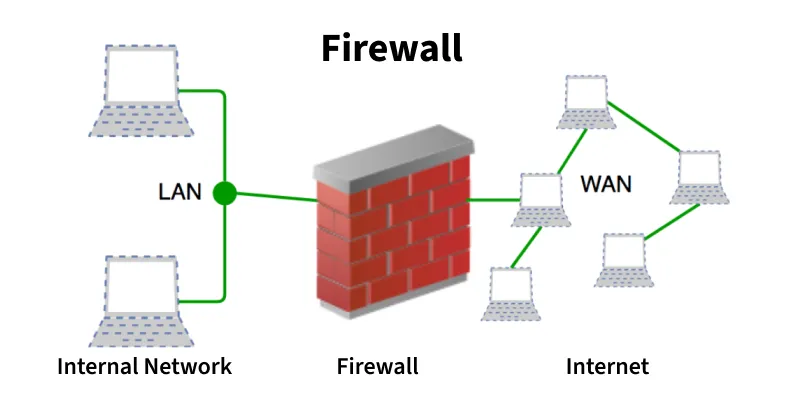
A firewall is a network security device that monitors and control the incoming and outgoing network traffic based on predefined rules.
The term firewall is taken from the construction practice of building walls in between the middle of building designed to contain a fire. Similarly, network firewall also work between the internal and external network in order to maintain safety of network.
A firewall acts as a security guard of a college , When any student tries to enter in the college the guard first checks whether this student belongs to this college or not. If he is a student of that college then only your are allowed to enter. In the same way, a firewall checks every data packet that enters or leaves the network.
Based on predefined security rules it decide whether to ALLOW, DROP, or REJECT the packets.
This ensures that only safe traffic can enter in a network.
Why Security leaves there ?
Firewall is the first line of defense.
If something bad enters your system:
Data can be stolen
Servers can crash
Malware can spread
So security starts here, not later.
Firewall helps prevent:
Unauthorized access
Hack attempts
Malicious traffic
Data leakage
Load Balancers
A load balancer is networking device or software application which is used to distribute and balance the incoming traffics among the servers to provide high availability, utilization and high performance.
It works like a traffic cop. When there is traffic on the roads, the cop directs the vehicles by deciding
which vehicle should go first and which route it should take, so that everyone can move smoothly and reach on time.
In a similar way, a load balancer sits in front of the network.
When a heavy load or a bunch of requests arrive, the load balancer first checks the health of the servers.
Then it distributes the requests to different servers based on certain algorithms,
so that all users get a fast response and overall performance is maintained.
There are two types of algorithms based on which a load balancer decides which server will process a request:
Static Algorithms
Dynamic Algorithms
Why scalable systems need it?
Scalable systems are designed to handle heavy growing traffic. Without load balancer the one server can become overload and fails.
Load balancers help system to :
Handle high traffic
High availability
Improves performance
Enables scalability
Better Resource utilization
That’s why a load balancer is Important.

How all these devices work together in a real-world setup?
Now, let us understand the flow of a request with the help of these devices.
When you type swiggy.com in your browser:
Your browser sends a request from your device.
The request first reaches the switch, which forwards it to the router.
The router receives the request and, with the help of the modem, converts the digital data into signals suitable for transmission over the internet.
The router then checks its routing table and decides the best path for the request.
The request travels through this path and reaches the ISP (Internet Service Provider).
The ISP forwards the request towards the destination server.
Before reaching the server, the request passes through a firewall, which checks whether the request is safe and valid.
If the request is allowed, it is forwarded to the load balancer.
The load balancer receives the request and decides which server should handle it, based on server health and load, so that the response is fast and performance is maintained.
The selected server processes the request and starts sending data packets as a response.
These data packets may travel through different routes on the internet.
When they reach the user’s device, they are reassembled in the correct order, and finally, the user sees the result in the browser.
Request flow
User Device → Switch → Router → Modem → ISP → Firewall → Load Balancer → Servers
Response flow
User Device ← Switch ← Router ← Modem ← ISP ← Firewall ← Load Balancer ← Servers

Final Words
In wrapping up, it’s clear that the internet is a complex system powered by a variety of networks devices working in balance. Each device, from switch to routers, modems, firewall and load balancers, plays a specific role in ensuring that our digital communication are fast, reliable and secure.
By understanding these components, we gain deeper knowledge of technology that connect us to the world and support our daily online activities.

